
Most people spend years sitting at desks — in school, at work, during their commute — and never once learn the correct way to do it. Poor sitting posture is one of the most common and preventable causes of back pain, neck pain, headaches, and shoulder tension that Dr. French sees in patients from Norwalk and Fairfield County. The good news is that a few simple adjustments to your office chair setup can make a significant difference.
If driving is part of your daily routine, see our separate guide on how to position your car seat to reduce back and neck pain on long drives.
Why Office Chair Posture Matters
All the weight of your body falls in front of your spine. Your back muscles are constantly working to keep you upright against that load. When you sit incorrectly — slumping, leaning forward, twisting toward a screen — those muscles work even harder, for hours at a time, day after day. Over months and years this creates chronic muscle fatigue, joint irritation, and the kind of persistent back and neck pain that doesn’t resolve with rest alone because the cause is repeated daily every time you sit down.
The following adjustments work together as a system. Making one change without the others produces limited results — but setting up your chair and workstation correctly from the start addresses the root cause rather than managing symptoms.
The Six Key Elements of Correct Office Chair Posture
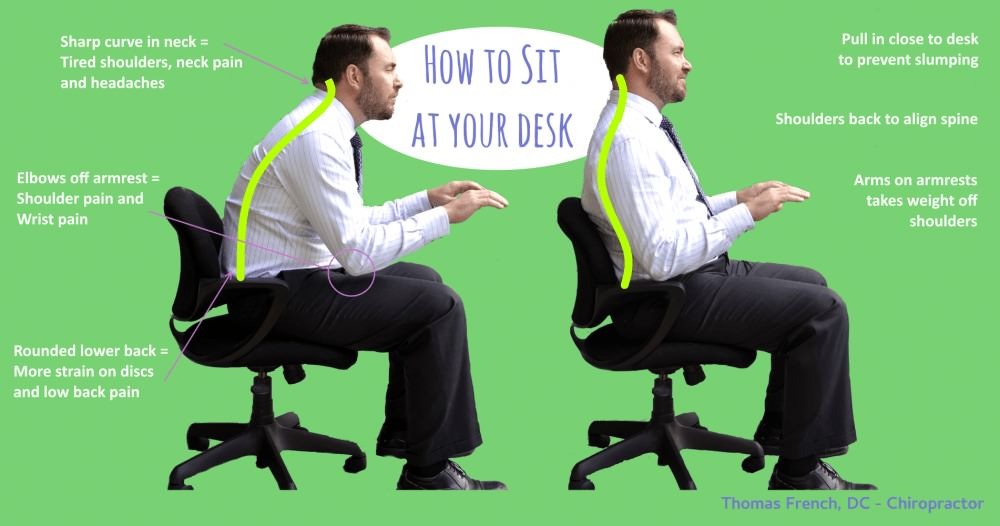
1. Start With Your Shoulders
Your shoulders are the single most important factor in sitting posture. When your shoulders are pulled back, the weight of your arms falls behind your spine — providing a counterweight that reduces the load on your back and neck muscles dramatically. When shoulders round forward, the opposite happens: your arms pull your entire upper body forward, your neck juts out to compensate, and the muscles of your upper back and neck work overtime just to hold your head up. If there’s one adjustment you make from this list, make it this one — pull your shoulders back and hold them there.
A practical tip: set a phone reminder every 45 minutes that simply says “shoulders.” Check your position when it goes off. Most people find they’ve slumped forward within minutes of sitting down, and the reminder breaks the pattern before it becomes pain.
2. Position Your Screen at Eye Level
Your monitor should be directly in front of you — not to the side, not too low, not too high. The top of the screen should be at eye level so your head is in a neutral position when looking at it. A screen that’s too low forces the chin down and the neck to flex forward — adding significant load to the cervical spine for every inch of forward head position. A screen that’s off-center forces a constant rotational twist into the neck and upper back.
Arrange your desk so the monitor is centered on your body. If you use two monitors, position the primary screen directly in front and the secondary screen to the side — not both side by side forcing you to constantly turn. Raise your monitor using a stand or books if needed to bring it to eye level.
3. Be Careful With Laptop Use
Laptops are ergonomically problematic because the screen and keyboard are attached — you can’t position one correctly without compromising the other. Leaning over a laptop to see the screen while lifting your arms to type is a recipe for neck and upper back pain. Laptop posture problems are extremely common in patients who work remotely or travel frequently for work.
The best solution is to use your laptop sparingly while traveling and connect to a full desktop setup at your desk. If that’s not possible, invest in a separate external monitor to plug into at your workstation, or a detachable keyboard so you can elevate the laptop screen to eye level while keeping the keyboard at the correct height. Either solution eliminates the core ergonomic problem of the attached screen-keyboard combination.
4. Support Your Arms
When your arms are unsupported — whether typing or using a mouse — their weight gradually pulls on your neck and shoulders. Over the course of a workday this creates significant tension in the trapezius and levator scapulae muscles, which are the same muscles that produce tension headaches and the classic “knot” in the upper back between the shoulder blade and spine.
Your chair’s armrests should support your elbows at a height that allows your shoulders to stay relaxed — not raised up to reach the armrest, not dropped down because the armrest is too low. Your forearms should be roughly parallel to the floor when typing. If your chair’s armrests don’t adjust, a small foam pad on the desk surface near the keyboard can provide the support your arms need.
5. Consider a Standing Desk
Standing desks have become increasingly common in offices and home workspaces. Their real benefit isn’t that standing is inherently better than sitting — it’s that they allow you to alternate between positions throughout the day, breaking up the prolonged static loading that causes most sitting-related pain. Standing eight hours a day every day comes with its own set of problems, including lower leg fatigue and foot pain.
The most effective use of a standing desk is to alternate: sit for 45-60 minutes, stand for 15-20 minutes, repeat. This pattern keeps the muscles active and the joints moving without overloading any one position. If you work from home and a standing desk isn’t in the budget, even standing at a kitchen counter for one hour of your workday produces meaningful postural benefit compared to sitting all day.
6. Take Regular Breaks
No amount of correct posture eliminates the problems caused by staying in any single position for too long. The spine is designed for movement — the discs between your vertebrae are nourished by the pumping action of movement and compressed by prolonged static loading. Take a brief break every 45-60 minutes: stand up, walk to get water, do a few shoulder rolls or neck stretches. Even 60-90 seconds of movement resets the muscles and reduces the cumulative strain of a full workday.
Setting Up Your Chair Correctly
Beyond posture habits, the physical setup of your chair matters. Here’s a quick checklist:
- Seat height — your feet should rest flat on the floor with your knees at approximately 90 degrees. If the chair is too high, use a footrest.
- Seat depth — there should be 2-3 finger widths of space between the back of your knee and the seat edge. A seat that’s too deep forces you to slide forward and lose lumbar support.
- Lumbar support — the chair’s lumbar support should fit into the natural inward curve of your lower back. If your chair has no lumbar support, a small rolled towel or lumbar cushion placed at belt level works well.
- Armrest height — elbows at 90 degrees, shoulders relaxed, forearms parallel to the floor.
When Posture Fixes Aren’t Enough
If you’ve corrected your workstation setup and posture habits and are still experiencing back pain, neck pain, or headaches after two weeks, the problem may have moved beyond postural — joint restrictions, disc irritation, and chronic muscle tension don’t resolve with posture changes alone once they’re established.
Dr. Thomas French has treated many Norwalk and Fairfield County patients whose pain began with desk work and progressed to a structural problem requiring chiropractic care. A brief evaluation identifies whether your pain is postural, structural, or both — and what the most direct path to relief looks like.
Book an appointment online or call (203) 939-9700. Located at 148 East Avenue, Suite 1D, Norwalk, CT — with free parking and same-day appointments available for patients in acute pain.
Serving patients from Norwalk, Westport, Wilton, Darien, New Canaan, Stamford, and Fairfield.